The Allodial difference
Empathy is the job.
Most teams build what they’re asked for. We work out what your users will need at the moment it matters, then build that, fast. Here’s how we think, shown on a real product you can open on your phone.
What we bring
We start with your user’s worst moment, not your feature list.
Before anything is built, we walk through your users’ day hour by hour: where they are, what they’re holding, what they’re afraid of, what happens when the signal drops. The details that make a product feel like it reads minds come from here.
One mind across the whole product.
Product, design, research, engineering and testing held by the same people, with no handoffs. Understanding doesn’t leak out between roles, because there are no roles to leak between.
AI for execution. Judgment for everything else.
We use AI to research, write, build and test at a speed that used to take a team. We don’t let it decide what to build, what’s safe, or what stays private. We read everything it produces against the source.
We verify, say what we don’t know, and fix mistakes in the open.
Claims are checked against primary sources. Unknowns are labelled as unknowns. When we’re wrong, you hear it from us first.
Privacy and trust are designed in.
Sensitive data stays as close to your users as possible, and every release is checked automatically for anything that must never be published.
We stay after launch.
Done means your users succeeded, not that the scope shipped. We watch how the product is actually used and ship fixes the same day.
A different kind of engagement
Plenty of hired teams are excellent, and many care. But the way most projects are bought pulls the other way: the job is defined by someone else, success is measured by delivery, and the person who understands your users is rarely the person writing the code.
| Topic | A typical pay-for-hire shop | Allodial |
|---|---|---|
| Starts from | A spec or a ticket | Your user’s week, hour by hour |
| Requirements | Gathered, signed off, frozen | Discovered by imagining the experience, then checked against reality |
| Who understands the user | A researcher or PM, several handoffs from the code | The same people who design, build and test |
| Pace | Phases: discovery, design, build, QA | Working releases from the first days, many times a week |
| The small details | First to be cut when time is short | Where the product is won |
| Bad news | Softened or delayed to protect the timeline | Said plainly and early |
| Done means | The scope shipped and was signed off | Your users got the outcome |
| After launch | Handed to support | We’re still there |
Proof
Five days. Two travelers. One product built around them.
Two first-time travelers, Spanish-first and phone-only, flew to Colombia for five days of dental and skin treatments. They were nervous. We built them a 23-tab, offline-first mobile app in five days: 55 releases, a 38,000-word research base with 158 sources, Spanish cards to hand to doctors, an arrival-night safety plan, a built-in assistant, and live support during the trip. The demo uses fictional travelers and the same level of detail.
- 5days
- 23tabs
- 55releases
- 158sources
How we think
The thinking behind it
What follows is the full guide we wrote after the build: twenty-one skills that turn empathy into a practice, with the limits of the case stated plainly. Read it straight through, or start with the quick reference.
Empathy Is the Job
The argument
Copy link to The argumentA belief is going around: AI now replaces the product manager. It writes the spec, the copy, the code and the tests, so the person who used to sit between those jobs is no longer needed.
Half of that is right. AI replaces execution. In the build this guide draws on, it did the research legwork, the writing, the code, the tests and the releases. It did not decide what to build, what was safe, what had to stay private, or when it was wrong, and it was wrong more than once. It answered every question it was given. Someone still had to choose the questions and check the answers.
That remaining part is judgment, and the judgment that matters most is empathy. The word needs correcting before it’s useful. Empathy here is a practice, not a feeling: imagine one real person’s experience moment by moment, ask what she needs at each moment, chase the small details you can’t yet answer, then check what you imagined against what is true.
Most of those questions are asked of yourself. The builder in this case put few of them to the two travelers. He put them to himself, by imagining. One example: two first-time travelers land near midnight and walk into immigration. The airport signal is weak, their travel eSIMs haven’t connected yet, and they’re nervous. What will the officer ask? Why does an officer ask that? What is a short, true answer? The likely questions, the reasons behind them and the answers, in Spanish, went into the app, readable offline, before the travelers needed them. Nobody requested that screen. The travelers couldn’t have, because they had never stood in that line.
Imagining is also how builders fool themselves, so the second half of the practice is checking: against primary sources, against the people themselves, and against what happens in the field.
From outside, the practice looks like overthinking. In this build it was the part the tools didn’t do. What follows breaks it into twenty-one skills, for people designing their own products.
If you read nothing else
Copy link to If you read nothing elseAI does the execution. You keep the judgment. Tell it the user’s situation, read what it produces against a source, and keep the calls on safety, privacy and when to stop.
Pick real people, not a persona. Collect facts about them: the time they land, the phone they carry, the language they think in. A persona has no landing time.
Ask yourself the questions. Walk through their week in order. At each moment: where is she, what is she holding, what is she afraid of, what can go wrong, what does she need in hand?
Chase the small unknown. The first question you can’t answer is where the work is. Most answers won’t matter. A few will be the product, and you can’t tell in advance which.
Check what you imagined. Primary sources for facts about the world. A short question to the person for facts about her. The field for behavior. Say plainly what you looked for and didn’t find.
Design the worst moment first. No signal, no battery, midnight, a language barrier. One rule per crisis, with the exact words to say.
Decide where you know more, and leave them what is theirs. One recommendation with a reason. Where the stake is their body, their money or something irreversible, lay out the options. They will sometimes choose differently. Design for the path they take.
Stay through first use. Plans meet reality on day one. Be reachable, and turn what happens into changes fast enough to help the same people.
Judge it by what they did. Tabs and releases measure effort. The evidence is what a user did, or avoided, because of the product.
The case in brief
Copy link to The case in briefTwo travelers, both Spanish-first and phone-only, flew to a city in Colombia for five days of dental and skin treatments. Neither had been to the country. Both were nervous. One product leader, working with AI, built them a 23-tab, offline-first mobile app in five days: 55 releases, a 38,000-word research base with 158 sources, a built-in assistant, Spanish cards to hand to doctors, an arrival-night safety plan, hidden jokes governed by strict rules, and live support throughout the trip.
The AI cost was about $15–25 of a subscription, not counting the builder’s time. For comparison, the companion case study estimates that a US agency would have charged roughly $150,000–350,000 for that scope on that timeline before AI. That figure is an estimate. Nobody asked an agency to bid.
With two users there is no average to hide behind: each decision either helped a real person at a real moment or it didn’t. And because AI did the execution, the build shows what was left over.
See it for yourself. A demo of the app, with fictional travelers and the same level of detail, is live at demo-trip.bits.fit. Open it on your phone, tap through the tabs, and ask the assistant a question. Load it once, then try it in airplane mode.
Open the demo (new tab)Limits of this case
Copy link to Limits of this caseRead the rest with these in mind.
- Two users. Both were people the builder knew and cared about. He could message them at any hour, and they had reason to use what he made. Most products have neither advantage.
- No metrics, no comparison. The evidence is a short list of incidents from one trip, reported by the builder, and this guide is written from his side. Nobody ran the trip without the app, so there is no way to know what it prevented.
- The cost leaves out the main input. The $15–25 covers the AI. The builder’s hours over five days were not counted, and neither was the product experience that told him what to ask for and what to distrust. Those were the real cost.
- The agency figure is an estimate, useful for order of magnitude and nothing finer.
- It was built by one person. There were no handoffs to lose context in, and no second reviewer. A team has to get the same result by carrying the reasons along with the tickets.
- One traveler took a different path than the app’s most important recommendation. The app advised a consultation first and nothing irreversible until the clinic’s license could be verified. She chose to proceed differently. That was her decision to make.
The last point is a lesson, not a footnote. Empathy informs decisions. It doesn’t control other people’s choices, and a product that only works when its advice is followed is fragile. The useful response was to design for the path she actually took: the app stopped recommending and started supporting, with questions to ask, signs to watch for and a contingency already priced (chapter 19).
What transfers to a larger product: the questions, the order of work (worst moment first, irreversible and dated first), grading every claim, and staying through first use. What doesn’t transfer directly: personal access to every user, hand tailoring for each one, and one person answering at midnight. For those, pick a few real users, build for them, and check how far the result generalizes.
Imagination and evidence
Copy link to Imagination and evidenceImagining a user’s day is the cheapest research there is, and the easiest to get wrong. Done loosely it produces the mirror: your own worries, attributed to someone else, in convincing detail.
How to imagine rigorously
- Start from facts you collected. A landing time, a phone model, a first language, a data plan. Each imagined scene should begin with something you could show another person.
- Walk the clock in order. Don’t skip to the interesting parts.
- Mark the substitutions. Wherever you wrote what you would feel or do, flag it. That’s a guess about them.
- Write each result as a claim that could be wrong. “She’ll have no data at the immigration desk” can be checked. “Arrival will be stressful” can’t.
How to check it
- Facts about the world: go to the primary source. Registries, the provider’s own terms, the official site, the actual calendar.
- Facts about the person: ask, briefly. Imagining doesn’t replace asking. It tells you which three questions are worth her time.
- Behavior: only the field shows it. Watch what they do, and write down where it differed from what you pictured.
How the imagining scored in this case
What held up:
- The arrival-night plan was used as written. The driver and plate were confirmed in writing before boarding, an unneeded second passenger was declined, and the ride went straight to the hotel.
- A card benefit one traveler didn’t know she had (airport lounge access for both) was used on every leg.
- At the border, officers questioned one traveler. She had followed the app’s guidance, there was nothing to find, and she was released.
What didn’t:
- A store quoted a price for an untagged item and raised it 20% at the register. The app hadn’t covered this. The traveler handled it herself, and the lesson was added afterward.
- The app asked a traveler for details she had already sent days earlier. The builder’s picture of her was out of date. The mistake was owned and fixed.
- One traveler took a different path than the most important recommendation, as described above.
- A couple of scares came up during the stay regardless. The travelers acted immediately, and nothing came of them.
The first list is not proof and the second is not failure. Together they are what checking looks like: a short, specific record of where the picture in your head matched the world.
How to use this guide
Copy link to How to use this guideEach chapter has the same parts: the skill, why it matters, how to practice it, failure modes, how it showed up in the case, questions to ask yourself, and an exercise for a live product that takes an hour or less. Each chapter stands alone. Pick the three where your product is weakest and do those exercises.
Rate yourself
Your profile
Rate your product on each chapter (1 to 5). Your answers stay in this browser.
Your three weakest skills
Rate a few chapters to see where to start.
Quick reference
- 01Know the user, not the personaCan you write their Tuesday hour by hour?The rule Collect facts, not adjectives.
- 02Solve the problem, not the requestWhat would they wish they had known?The rule Separate the job from the artifact.
- 03Research like it’s evidenceCould you show the primary source today?The rule Know the grade of every claim.
- 04Scope is a promiseIs your not-doing list written down?The rule Narrow the audience to afford depth.
- 05Prioritize by consequenceWhat happens to the user if this is missing?The rule Irreversible and dated goes first.
- 06Make decisions for your usersDoes any screen list options without a pick?The rule One pick, one reason.
- 07Design for the worst moment firstDoes it work in airplane mode at midnight?The rule Online, offline, paper, person.
- 08AnticipateWhere does each sentence live, and when does it appear?The rule Help arrives one step before the need.
- 09Personalize until it fitsIs any advice measured from “downtown”?The rule Personalize inputs, not greetings.
- 10Design for the groupWho is beside the user, and what do they see?The rule Mine, ours, and the people at home.
- 11Speak their languageAre the hard sentences already written?The rule The listener’s language for what’s said.
- 12Write like it’s the interfaceCould a tired person act on it without thinking?The rule Numbers, names and rules.
- 13Delight, with disciplineDo search and the assistant know it’s a joke?The rule Surprise is a reward, never a tax.
- 14Respect attentionWhat did you interrupt them for last week?The rule Signal only what changed a decision.
- 15Earn trustWhat did you tell users the last time you were wrong?The rule Verify, disclose, correct.
- 16Privacy by designDoes this need to leave the device?The rule Give every fact a home.
- 17Build with AIDid you read the output against the source?The rule Judgment in, execution out.
- 18Ship fast without breaking trustWould release 40 pass the checks release 1 did?The rule Automate the invariants.
- 19Close the loop in the fieldHow long from surprise to shipped fix?The rule Every incident becomes content.
- 20Own the outcome, not the scopeWould you be embarrassed if it failed them?The rule Done is a sentence about the user.
- 21Measure what mattersWhat did they do because of you?The rule Behavior, not inventory.
Part I — See clearly
1. Know the user, not the persona
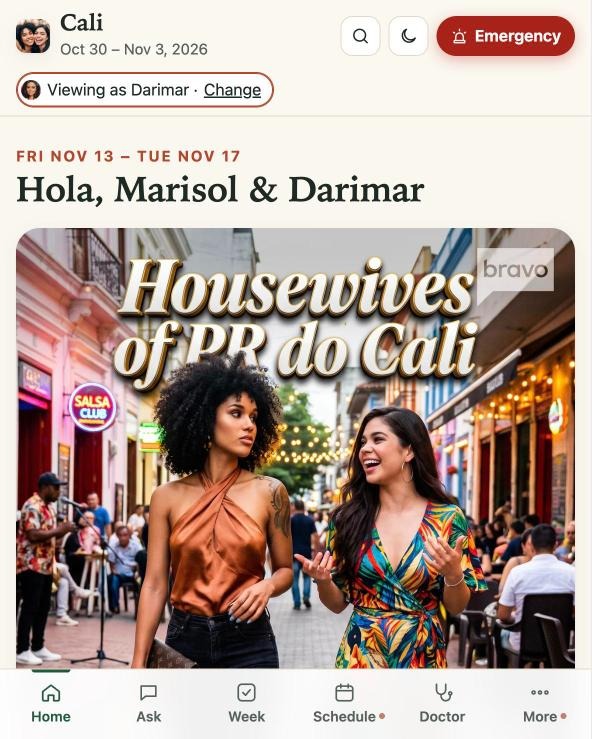
Copy link to chapter 1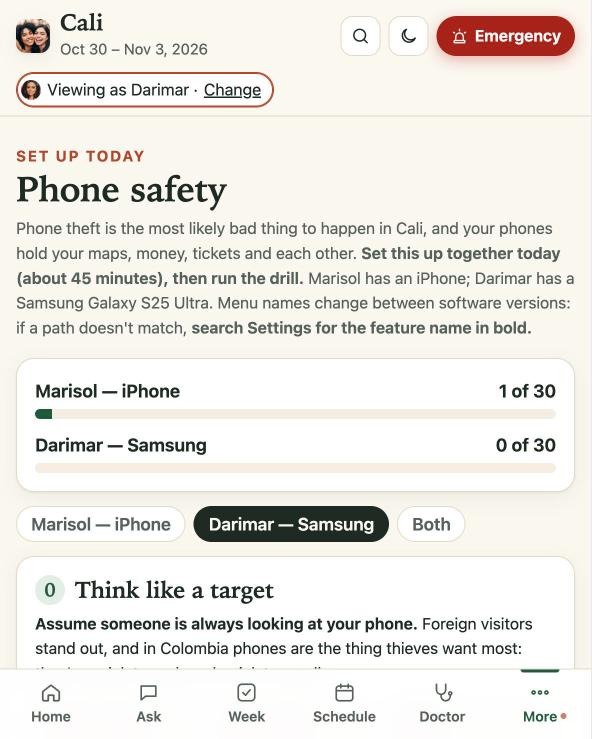 (enlarge)
The skill
Know specific people in specific situations well enough to predict what they’ll feel and need.
Why it mattersCopy link to Why it matters, chapter 1
A persona averages people out. “Travelers aged 25–40” has no fears, no phone, no first language and no landing time. A product built for the average fits nobody exactly, and users pay for the gap with their own effort.
How to practice itCopy link to How to practice it, chapter 1
- Write the user’s week hour by hour before you write a feature list: where they are, what they’re holding, how tired they are, who’s with them, what the signal is like.
- List their fears beside their goals. Goals produce the obvious features. Fears produce the ones people remember.
- Collect facts, not adjectives. “Lands at 11:37 PM” designs a screen. “Busy traveler” designs nothing.
- Ask yourself first, and keep going past the point where it feels necessary. Which phone? Which data plan? Who’s meeting them? The first question you can’t answer is where the work is. Take that one to the user.
- With a large user base, pick three real people and build for them, then check how far the result generalizes.
Failure modes
- The composite. A persona stitched from twenty interviews, true of none of them.
- The mirror. Designing for yourself and calling it the user. Imagining makes this easy to do, which is why it has to be checked (see “Imagination and evidence”).
In practice
- The builder knew the travelers’ phones (one on each of the two major platforms), their landing time (11:37 PM), their first language, their treatments, and that neither had been to the country.
- Each fact became design: safety settings written per phone down to the menu names, a full arrival-night plan, Spanish cards for doctors, a schedule built around recovery.
- They were traveling from the Caribbean, so nights of about 66 °F (19 °C) would feel cold. Warm pants and a jacket went on the packing list.
Ask yourself
- Which fact about a real user changed a design decision this month?
- At the moment of highest need, what is my user holding, and what’s the signal?
Exercise
Pick one real user. In 30 minutes, write next Tuesday for them hour by hour. Mark every hour where your product could help and doesn’t. Take the three biggest gaps to your next planning session.
Copy link to Exercise, chapter 12. Solve the problem, not the request
Copy link to chapter 2The skill
Look past what people ask for to the situation they’re actually in.
Why it mattersCopy link to Why it matters, chapter 2
People ask for what they can imagine. The most valuable work is usually something they couldn’t have requested, because they didn’t know the risk or the option existed. Build the request literally and you deliver the artifact while the problem stands.
How to practice itCopy link to How to practice it, chapter 2
- Run the hindsight question early: “what will they wish they had known?” Then move that knowledge to before the experience.
- Separate the job (get through the trip safely and enjoy it) from the artifact (an itinerary).
- Hunt for what they can’t request: risks they haven’t heard of, entitlements they don’t know they hold, deadlines buried in someone else’s fine print.
- Restate the request as an outcome and check it with the person who asked. Reframing without checking is guessing.
Failure modes
- The order-taker. Building exactly what was asked, faithfully, and missing the point.
- The hero reframe. Deciding you know the “real” problem without checking, then solving something nobody has.
In practice
- The request was roughly “help them plan the trip.” The problem was two nervous first-timers, medical procedures, a midnight arrival and real safety risks in a city they didn’t know.
- That reframing produced the printed emergency card, the decoy-phone plan, the registry checks on the clinic and a “consultation first” decision gate. None of them belongs in an itinerary.
- A traditional spec would have captured the screens, the map and the schedule. The rest came from imagining the trip from inside it, hour by hour.
Ask yourself
- If I delivered exactly what was requested, what could still go wrong for this user?
- What does the user not know enough to ask for?
Exercise
Take the top request in your backlog. Complete this sentence: “They asked for X because they’re trying to Y, and they’re afraid of Z.” If you can’t fill in Y and Z from evidence, go and ask.
Copy link to Exercise, chapter 23. Research like it’s evidence
Copy link to chapter 3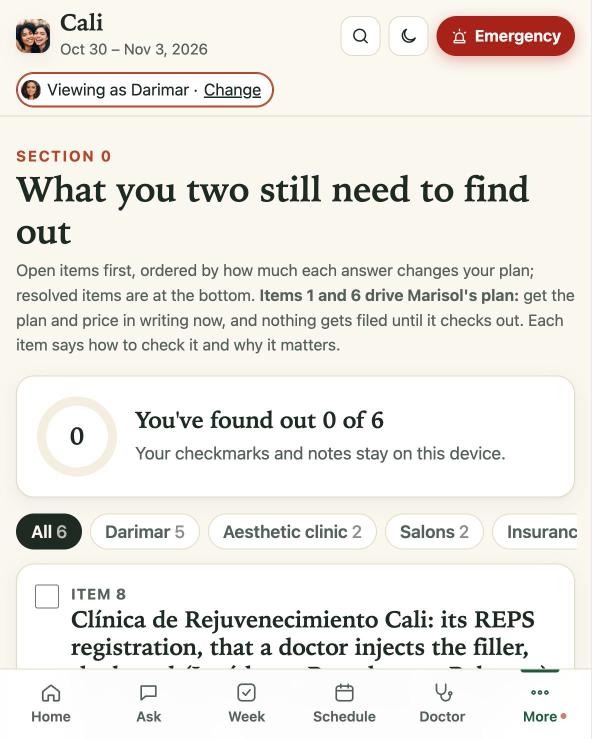 (enlarge)
The skill
Build a body of knowledge you would stake the user’s safety on, and know the grade of every claim in it.
Why it mattersCopy link to Why it matters, chapter 3
A product can’t be better than what it knows. AI has made plausible text free, which raises the value of verified text. A fluent paragraph and a true paragraph look identical. Only one has a source. Someone will act on what you wrote.
How to practice itCopy link to How to practice it, chapter 3
- Use a source ladder: primary sources (registries, regulators, the provider’s own terms, the official site) over reputable secondary sources over anecdote. Climb it for anything touching safety, money or law.
- Keep one source of truth: a single research document the product is built from. Correct a fact there first, then in the product.
- Grade every claim as verified, estimated or unknown, and carry the grade into the product.
- Treat absence as a finding. “No record found” is information. Report it and design around it.
- Check date-sensitive facts against the actual calendar of the user’s week: holidays, opening days, deadlines.
Failure modes
- Fluent fiction. Accepting confident AI output because it reads well.
- The citation costume. A source is listed, but it doesn’t say what the sentence claims.
In practice
- The research base ran to 38,000 words with 158 sources and was revised 57 times. The app was built from it.
- Claims were checked against primary sources: government health and professional-license registries, the airline’s own rules, the official immigration form site, official consular and travel-advisory pages.
- The Monday of the trip was a public holiday. Research flagged it early, checked which clinics and salons would close, and the plan moved around it.
Ask yourself
- Which claims in my product would hurt most if wrong, and when were they last checked?
- What did I look for and fail to find, and did I say so?
Exercise
List the five claims in your product that would do the most damage if wrong. For each, find the primary source and record the date you checked it. Count the ones you couldn’t verify, and decide what the product should say about those.
Copy link to Exercise, chapter 3Part II — Decide
4. Scope is a promise
Copy link to chapter 4The skill
Choose who and what the product is for, narrowly enough to be excellent, and refuse the rest on purpose.
Why it mattersCopy link to Why it matters, chapter 4
Every feature you ship is a feature you must keep correct. Breadth spreads attention thin. Narrowness pays for depth. You can also only know a few people well. Each widening of the audience replaces something you knew with something you assumed.
How to practice itCopy link to How to practice it, chapter 4
- Write the scope sentence: for whom, in what situation, over what period. If it contains “and others,” keep cutting.
- Keep a not-doing list as visible as the roadmap, with a one-line reason per item.
- Cut by user moment, not by feature. Before removing anything, ask which moment loses its cover.
- Ship the ”don’t bother.” Telling users what isn’t worth their effort is a feature.
Failure modes
- The everything app. Serves all users in general and no user in particular.
- Cutting the small things first. Under time pressure the details go, and the details were the point.
In practice
- The scope sentence was two people, one city, one week. That narrowness made it possible to measure every distance from their hotel and write settings for their actual phones.
- The refusals were explicit: no option lists where a recommendation would do, no “New” banners, no jokes in high-stakes sections, no driver details on the public site.
- The app told the travelers what to skip. The tourist sales-tax refund isn’t worth the airport line under about $150 of purchases.
Ask yourself
- Can I state who this is not for?
- When I last cut for time, did I cut a feature or a user’s moment?
Exercise
Write your product’s not-doing list: ten items, one reason each. Then find the thing you’re currently shipping that belongs on it.
Copy link to Exercise, chapter 45. Prioritize by consequence
Copy link to chapter 5The skill
When time is short, order the work by what happens to the user if it’s missing, not by what is easiest to build or best to demo.
Why it mattersCopy link to Why it matters, chapter 5
Deadlines pull teams toward visible work. The user’s calendar is indifferent to your sprint. Anything with a fixed date and an irreversible downside outranks everything else, however dull it is. Finding those dates means reading someone else’s fine print.
How to practice itCopy link to How to practice it, chapter 5
- Rank by consequence and reversibility: safety, then money, then time, then comfort, then delight.
- Work backwards from the fixed points in the user’s calendar, to the minute if needed.
- Dig out the deadlines hiding in the user’s world (cancellation windows, form windows, check-in times) and put them in front of the user.
- When the clock belongs to the user, resolve ambiguity on the spot.
- Improve until the last responsible moment, and tell users exactly when that is.
Failure modes
- Demo-driven priorities. The work that screenshots well goes first.
- Calendar blindness. The team’s schedule is planned in detail. The user’s isn’t on the wall.
In practice
- The flight home left at 3:01 PM. The app worked backwards to the minute: checkout, the drive, the immigration form window, the last possible appointment.
- The pre-trip to-do list carried real deadlines, including the last day to cancel the hotel without paying in full.
- “Save the app for offline in the car to the airport, not earlier.” The product kept improving until departure, and that instruction told the travelers where the last responsible moment was.
Ask yourself
- What on my list has a date I don’t control?
- If we shipped today, which missing piece would hurt a user in a way we couldn’t undo?
Exercise
List everything in flight. Next to each item, write what happens to the user if it’s missing on launch day and whether that can be undone. Re-sort by that column and compare with your current order.
Copy link to Exercise, chapter 56. Make decisions for your users
Copy link to chapter 6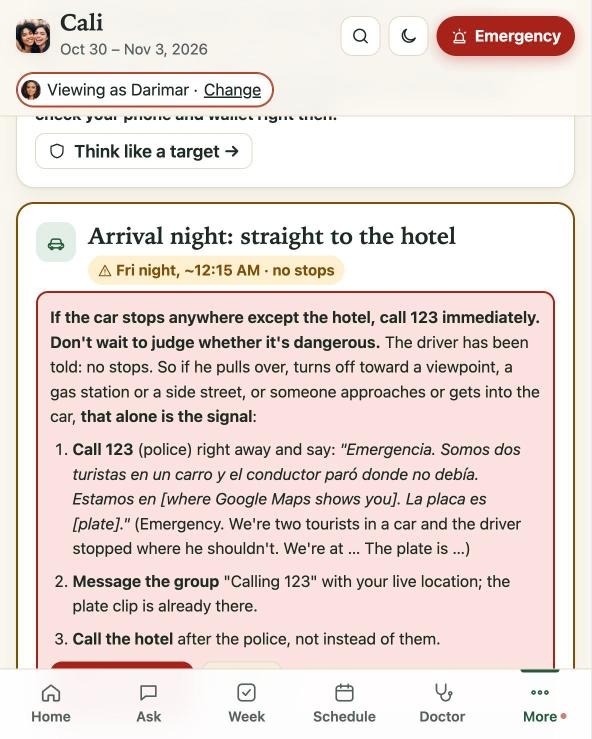 (enlarge)
The skill
Recommend one clear path and say why, instead of listing options.
Why it mattersCopy link to Why it matters, chapter 6
Every decision you decline to make becomes the user’s work, usually at the worst time and with less information than you had. A list of ten options feels respectful to the team that wrote it. To a tired person in an unfamiliar place it’s an assignment.
How to practice itCopy link to How to practice it, chapter 6
- Default to one recommendation with the reason in a sentence.
- Be opinionated where safety or money is at stake, neutral only where taste is.
- Always give the reason. A pick without a reason can’t be trusted, or adapted when circumstances change.
- Know the boundary. Where the stake is the user’s own body, money or an irreversible choice, lay out the options clearly and let them choose.
Failure modes
- The menu. Ten options, no pick.
- The unexplained decree. A pick with no reason, which users either ignore or follow blindly.
- Overreach. Deciding something that was the user’s to decide.
In practice
- “Book this restaurant Saturday; that one is closed Sunday” replaced a list of restaurants.
- “No stops on the way to the hotel, even if the driver offers” replaced “be careful.”
- The boundary held where it should. When no license record was found for the clinic, the app didn’t decide for the traveler. It changed the recommendation to “consultation first,” laid out the options and left the choice with her. She later chose a different path than the recommendation. Leaving a choice with the user means accepting that.
Ask yourself
- Have I decided anything that belongs to the user?
Exercise
Find one screen that lists options. Rewrite it as one recommendation, a one-sentence reason, and at most one alternative with the condition for choosing it.
Copy link to Exercise, chapter 6Part III — Design
7. Design for the worst moment first
Copy link to chapter 7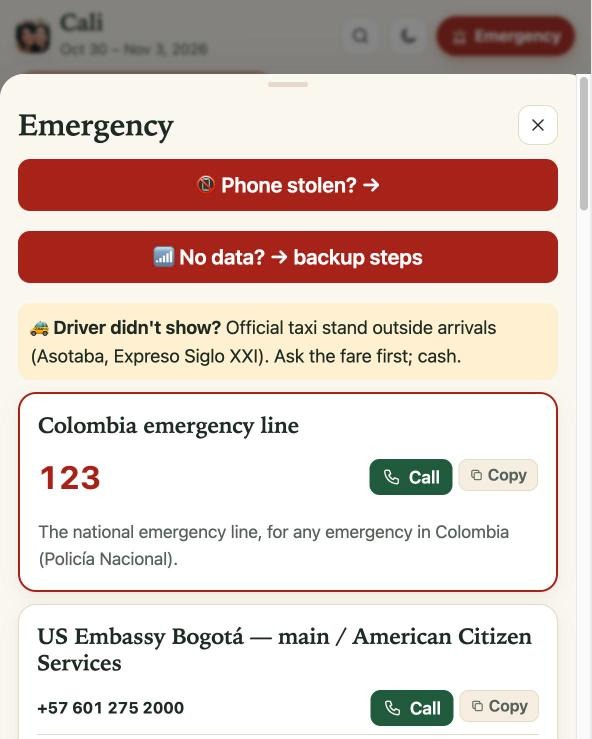 (enlarge)
The skill
Build for the moment when everything has gone wrong, then make the normal case easy.
Why it mattersCopy link to Why it matters, chapter 7
Products are judged at their user’s worst moment, not their average one. Something that only works with a strong signal, a charged phone and a calm user fails exactly when it’s needed.
How to practice itCopy link to How to practice it, chapter 7
- Name the worst realistic moments: no data, no battery, a lost phone, a medical scare, a language barrier, midnight.
- For each, ask what the product does then, and design that path first.
- Build a fallback chain: online, then offline, then paper, then a person.
- Write one rule per crisis, with its exceptions and the exact words to say. Nobody improvises well when frightened.
- Rehearse. A plan nobody has practiced is a document.
Failure modes
- Happy-path design. The demo flow is the only flow.
- The single point of failure. Everything the user needs lives on the one device most likely to be lost.
In practice
- The app works with zero signal: on the plane, in the taxi, in dead zones.
- A printed emergency card for each traveler, kept apart from the phone, covers the case where phones and wallets are both gone.
- A “give-up” wallet and a decoy phone were ready to hand over in a robbery, with the real ones hidden.
- One unambiguous rule for the riskiest moment: if the airport car stops anywhere but the hotel, other than for a light, traffic or a police checkpoint, call the emergency number immediately, with the exact Spanish sentence to say.
- The plan included a rehearsal: a drill in which each traveler finds the other’s phone from her own device in under two minutes.
Ask yourself
- What is the single device, account or connection my user can’t afford to lose, and what happens when they lose it?
- For my worst case, is there one rule, or a paragraph of advice?
Exercise
Pick your product’s worst realistic moment and simulate it. Airplane mode, signed out, low battery, wrong language, whichever applies. Try to finish the critical task and write down exactly where it broke.
Copy link to Exercise, chapter 78. Anticipate: the right information at the right moment
Copy link to chapter 8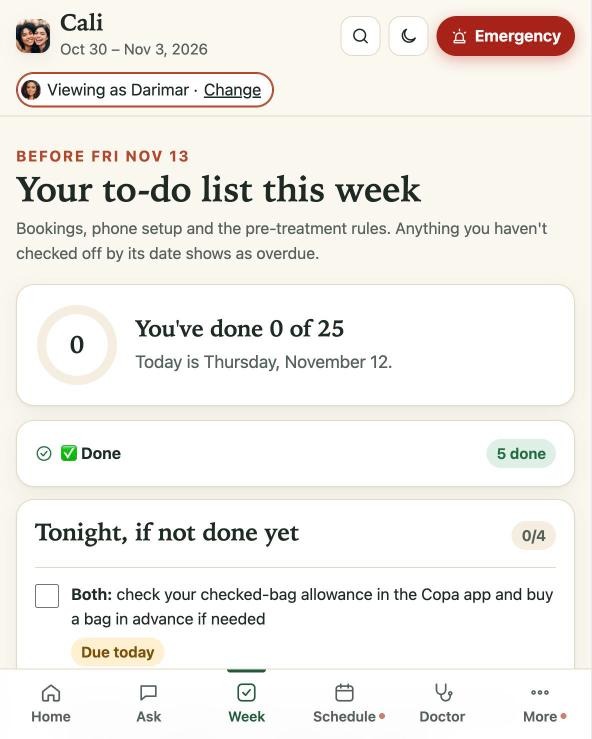 (enlarge)
The skill
Deliver each piece of help just before it’s needed, not all at once and not too late.
Why it mattersCopy link to Why it matters, chapter 8
People forget what they read a week early and can’t use what arrives an hour late. Timing is what makes help feel like mind-reading, and it comes from walking through the user’s day in order and asking, at each step, what she doesn’t yet know she’ll need.
How to practice itCopy link to How to practice it, chapter 8
- Map the journey as a timeline of moments: the week before, departure, arrival, the core experience, recovery, the way home, after.
- For each moment, write three things: what they feel, what can go wrong, what they need in hand.
- Trigger help from the user’s own schedule: alarms, to-dos with real deadlines, a “today” view.
- Order content the way it will be encountered, not the way it’s categorized.
- Surface entitlements the user doesn’t know they hold.
Failure modes
- The info dump. Everything on day one, nothing retained.
- The late warning. Accurate, and delivered after the mistake.
- The orphaned after. The journey map ends at purchase or at the flight home.
In practice
- The departure checklist ran in the order the travelers would hit things at the airport: bags, the liquids rule, security.
- For the immigration desk on arrival: the officer’s likely questions, why they’re asked, and short, true answers in Spanish, readable offline. The builder had pictured a weak airport signal and travel eSIMs not yet connected.
- A lounge-access reminder appeared for the airport. One traveler’s card included access for both, and she didn’t know. They used it on every leg.
- A receipts envelope went in the carry-on before customs. Right after landing came the data-line switch back to the home line, without which the customs app can’t submit. One line, at the last step of the trip.
- After the trip: which records to request from the clinic while it still answers quickly, and a reminder that warranties usually require prompt reporting of problems.
Ask yourself
- For each stage of my user’s journey, what’s the one sentence they need in hand?
Exercise
Draw your user’s journey as seven moments. For each, write one thing that can go wrong and the sentence that prevents it. Then find where that sentence appears in your product and when. Fix the worst mismatch.
Copy link to Exercise, chapter 89. Personalize until it fits
Copy link to chapter 9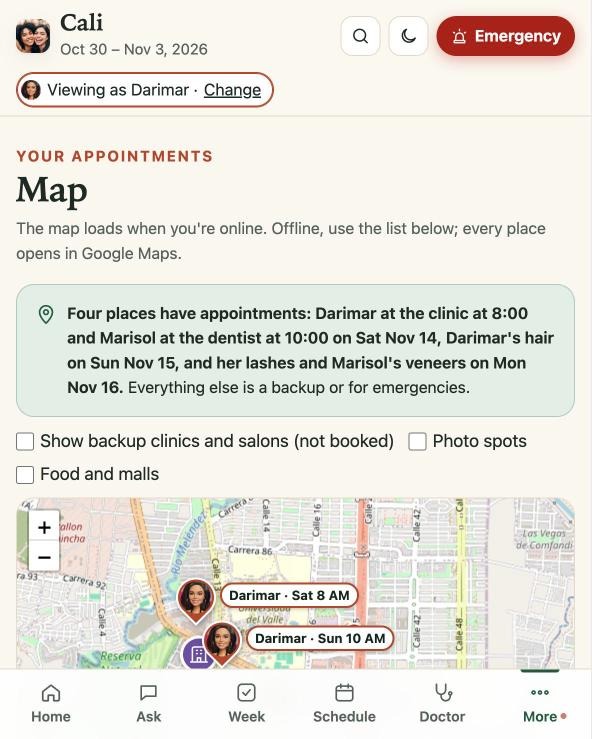 (enlarge)
The skill
Tailor the product to the people using it, as far as the economics allow.
Why it mattersCopy link to Why it matters, chapter 9
Generic advice makes the user translate it into her own situation: how far is that from where I’m staying, does that work on my phone, is that a lot of data for my plan? A tailored product has already done the translation.
How to practice itCopy link to How to practice it, chapter 9
- Personalize the inputs (their schedule, their devices, their location, their limits), not just the greeting.
- Anchor to their reference points: distance from where they’re staying, prices in the currency they think in, times on their clock.
- Personalize around constraints: what their plan allows, what their device can’t do.
Failure modes
- First-name personalization. “Welcome back” and nothing underneath.
- Settings as personalization. The user is handed the controls and told to fit the product to herself.
- Creepy fit. Tailoring based on data the user didn’t knowingly provide.
In practice
- Every distance was measured from their hotel: every restaurant, pharmacy, mall, photo spot and clinic.
- Photo days were scheduled around each traveler’s recovery from treatment, with golden hour (5:15–6:00 PM) reserved for the best day.
- The data budget was built on their actual plan: about 11 GB a day, with checkpoints at 1 PM, 6 PM and 10 PM. The checkpoints exist because of a fact someone had to go and find: neither phone can warn on a daily limit.
Ask yourself
- Where does my product give advice the user must translate into their own situation?
- Which personalization did we rule out on cost, and when was that cost last estimated?
Exercise
Find one piece of generic advice in your product (“near downtown,” “check your settings”). Rewrite it for one real user with their actual reference point, device and constraint. Then estimate what it would take to do that for everyone, using today’s tools.
Copy link to Exercise, chapter 910. Design for the group
Copy link to chapter 10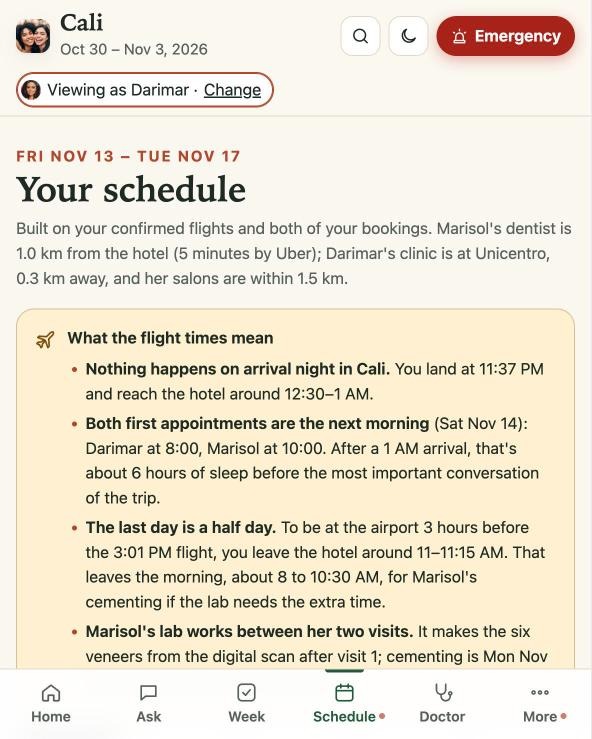 (enlarge)
The skill
When several people share a product, design each person’s view, the things they do together, and the people standing behind them.
Why it mattersCopy link to Why it matters, chapter 10
Most products model a single user. Real use is plural: the person acting, the person beside her, the person who organized it, the people waiting at home. Ignore that and the product gets noisy for everyone. It also wastes an asset, because a group is a safety system.
How to practice itCopy link to How to practice it, chapter 10
- Map the roles: who acts, who accompanies, who organizes, who watches from a distance.
- Split mine from ours: personal views for personal tasks, a shared view for the shared plan.
- Design joint rituals: setup done together, drills done together.
- Use the group as redundancy. Each member should be able to recover the other.
- Give the outer ring a job: a simple way for people at home to know things are fine.
Failure modes
- The invisible companion. The product serves the main user and ignores the person next to her.
- Group as audience. Others can watch, but have no role when something goes wrong.
In practice
- Each traveler had her own personal view of the trip, including the companion, who had treatments of her own.
- Phone safety was a 45-minute session to do together, ending in the find-each-other’s-phone drill.
- The arrival-night trick made family part of the safety system: film a cheerful “we made it!” clip that happens to show the driver’s face and the license plate, and send it to the family group chat before the car moves.
Ask yourself
- Who is physically next to my user when they use this?
- If one member of the group is cut off, can another restore them?
Exercise
List every person who touches your product around a single account or purchase. For each, write what they need to see, what they should never see, and what they could do if the main user were unreachable.
Copy link to Exercise, chapter 1011. Speak their language, literally and culturally
Copy link to chapter 11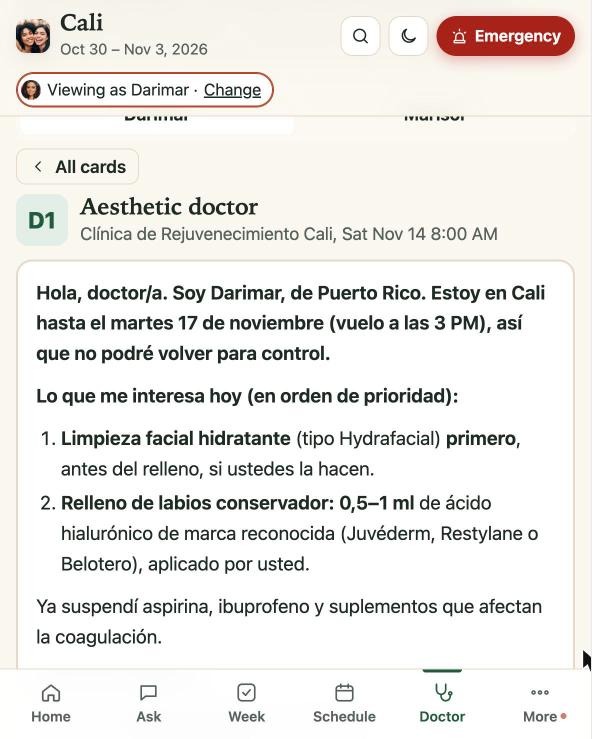 (enlarge)
The skill
Communicate in the user’s language, register and cultural frame, and prepare them for the language of the place they’re going.
Why it mattersCopy link to Why it matters, chapter 11
Stress strips vocabulary. Even fluent people lose words in a clinic chair or at a taxi window, and local customs stay invisible until someone breaks one. For each hard moment, ask what exactly she will have to say, and to whom.
How to practice itCopy link to How to practice it, chapter 11
- Match language to function: the listener’s language for anything the user will say or show, the reader’s best language for anything that explains.
- Prepare ready-to-use phrases for the high-stakes moments, placed at those moments and not in a phrasebook section.
- Make showing possible. A screen she can hand over beats a sentence she has to remember.
- Teach the local norms that change behavior: tipping, bargaining, safety habits.
Failure modes
- Translation as localization. The words are converted and the context isn’t.
- The phrasebook dump. Two hundred phrases, none of them where they’re needed.
In practice
- Ten ”show the doctor” cards in Spanish, one per clinician the travelers might see. Each is a single screen to hand over, saying what she wants, what she’d rather avoid on this trip and what she wants to leave with.
- The exact Spanish sentence for the emergency call on arrival night, a card to hand to a taxi driver, and short answers for the officer at the border.
- The local safety idiom, no dar papaya (“don’t hand them the opportunity”), taught along with the habits behind it.
Ask yourself
- At which moments must my user talk to a third party under pressure?
- Are the words for those moments already written, in the right language, on the right screen?
Exercise
Identify the three moments when your user must speak to a third party under stress: a support call, a professional, an official. Write the exact words for each in the listener’s language, in under 20 words.
Copy link to Exercise, chapter 1112. Write like it’s the interface
Copy link to chapter 12The skill
Treat every sentence in the product as design: specific, short and usable under stress.
Why it mattersCopy link to Why it matters, chapter 12
In most products the words are the product. A stressed reader doesn’t interpret. She executes, and vague advice hands the thinking back to her at the moment she has least to spare. AI produces prose in bulk. The edit that counts is reading each line as the tired person who will act on it.
How to practice itCopy link to How to practice it, chapter 12
- Replace adjectives with numbers and names: a time, an amount, a distance, a day.
- Write rules with their exceptions, so no judgment is needed in the moment.
- Add the reason in a clause. Reasons make a rule portable to situations you didn’t foresee.
- For anything medical, legal or financial, use plain language in three parts: what’s normal, what isn’t, when to act.
- Read it aloud at the pace of a tired person. Cut what they’d skip.
Failure modes
- ”Be careful” writing. Concern without instruction.
- Machine voice. Fluent, padded, says nothing wrong and nothing useful.
In practice
- The arrival-night rule from chapter 7 is a full specification in one sentence: a trigger, its exceptions, an action and a script.
- “Below this range usually means a cheaper material.” One clause that lets a traveler judge a quote on her own.
- Aftercare for each treatment in plain language: what’s normal, what isn’t, and exactly when to go to the emergency room. The nearest one was a ten-minute walk from the hotel, and the app said so.
Ask yourself
- Which sentences in my product require the user to exercise judgment I could have exercised for them?
- If the user could keep only one sentence from this screen, which would it be, and is it first?
Exercise
Find three sentences in your product containing “may,” “should consider,” “as needed” or “be careful.” Rewrite each with a number, a name or a rule.
Copy link to Exercise, chapter 1213. Delight, with discipline
Copy link to chapter 13The skill
Add moments of surprise and joy without ever costing the user time, clarity or trust.
Why it mattersCopy link to Why it matters, chapter 13
Delight builds affection and gets products talked about. In the wrong place it reads as carelessness, and next to safety information it’s dangerous. Telling the two apart means knowing the user’s state of mind section by section: where she’s browsing with time to spare, and where she’s scanning for one answer.
How to practice itCopy link to How to practice it, chapter 13
- Put delight where stakes are low and curiosity is high.
- Write the rules down and enforce them like any other requirement: allowed zones, banned zones.
- Make every system that touches content (search, maps, notifications, recommendations, AI assistants) aware of what’s real and what’s a joke.
Failure modes
- Confetti on the error page. Playfulness at the moment the user is worried.
- The polluted index. A joke entry surfaces in search or gets recommended by the assistant as if real.
In practice
- Hidden jokes looked exactly like real entries: a delivery listing for a baby hippo, a “photo spot” that turns out to be an airport fast-food counter. Their ordinary-looking links opened a photo of the builder.
- Allowed only in light-reading places: food, shopping, groceries, photo ideas, packing extras.
- Banned from emergency, safety, arrival night, medical, money, phones, flights and customs.
- Never in search results, never on the map, never in the nightly dinner picks, and never a trigger for an “unread” dot.
- The assistant knew they were jokes. It never recommended one, and if asked about one directly it laughed along, then gave the real answer.
The rules about where a joke may not appear are what make the jokes safe to have. Surprise is a reward for exploring, never a tax on someone who’s stressed.
Copy link to In practice, chapter 13Ask yourself
- Could any playful element in my product be mistaken for real information?
- Do my search, notification and AI systems know the difference?
Exercise
Write your product’s delight policy as two lists, allowed zones and banned zones. Then check each system that indexes or recommends content and confirm it can tell the difference.
Copy link to Exercise, chapter 1314. Respect attention
Copy link to chapter 14The skill
Spend the user’s attention as if it were their money.
Why it mattersCopy link to Why it matters, chapter 14
Every banner, badge and “New!” label teaches users to ignore the product, until they miss the one thing that mattered. Attention spent on your enthusiasm isn’t available for her safety.
How to practice itCopy link to How to practice it, chapter 14
- Signal change quietly and precisely: show where something changed and nothing more.
- Never notify for wording, polish or jokes.
- Keep an interruption budget. Only time-critical items earn an alarm, and they go in the tools the user already obeys.
Failure modes
- The alarm for everything. No hierarchy between “your flight leaves” and “we tweaked a label.”
- Engagement bait. Interruptions that serve the product’s numbers and not the user’s day.
In practice
- No “New” tags, no “What changed” lists, no banners.
- Small unread dots appeared only on sections whose content had actually changed. After each release the travelers could see where to look.
- Phone alarms were kept for exact times with consequences: check-in opening, leaving for the airport, the form window.
Ask yourself
- What did my product interrupt a user for last week, and did it change what they did?
Exercise
List every interruption your product sent one real user last week. Mark each: did it change a decision? Remove or quiet everything that didn’t.
Copy link to Exercise, chapter 14Part IV — Earn it
15. Earn trust: verify, disclose, correct
Copy link to chapter 15The skill
Be right, say when you’re not sure, and fix mistakes in the open.
Why it mattersCopy link to Why it matters, chapter 15
One confident error can undo a hundred helpful answers. Users forgive “I don’t know.” They don’t forgive “I was sure.” She is about to act on your word, so tell her plainly where your knowledge stops.
How to practice itCopy link to How to practice it, chapter 15
- Carry the grade of each claim into the product: verified, estimated or unknown.
- Deliver bad news plainly and early, with what to do next.
- When you’re wrong, say so, fix it, and change the process that let it through. All three.
- Name the scams and traps before users meet them.
- Hand users the means to verify for themselves in the moment.
- Gate the irreversible on verification. Nothing that can’t be undone proceeds on an unchecked claim.
Failure modes
- The confident error. Stated with the same certainty as everything else.
- The quiet fix. Patched silently, which teaches users that you hide things.
- The blanket disclaimer. “Consult a professional” standing in for doing the work.
In practice
- The clinic and its dentists were checked against government health and license registries. When the clinic’s license record wasn’t found, the app said so and the plan changed to ”consultation first, nothing irreversible until a license number checks out.”
- A hard gate sat in front of treatment: the plan in writing, with the final price, before agreeing to anything.
- A 30-second check gave the travelers their own verification before a product was used in a treatment: the brand, the Spanish label, the health-registry number, the lot, a photo.
- The official immigration form is free. Lookalike sites charge $50–100. The app linked only the official one.
- When the app asked a traveler for details she had already sent days earlier, the mistake was noticed and owned, and the request became a short confirmation.
Ask yourself
- What did we tell users the last time we were wrong?
- Which irreversible user action currently rests on a claim nobody checked?
Exercise
Find the last error your product made in front of a user. Write down what you told them, how fast, and which process changed as a result. If the third answer is “none,” expect the same error again.
Copy link to Exercise, chapter 1516. Privacy by design
Copy link to chapter 16The skill
Collect the minimum, keep sensitive data closest to the user, and make leaks hard by default.
Why it mattersCopy link to Why it matters, chapter 16
The most helpful products touch the most sensitive data, and trust built over weeks can be spent in one exposure. Some exposures go beyond embarrassment: a name on a public page can be a physical-safety problem. The duty extends to people who never opened the product, such as a driver who never agreed to appear in anyone’s app.
How to practice itCopy link to How to practice it, chapter 16
- Before storing anything, ask whether it needs to leave the device.
- Tier the data and give each tier a home: public, device-only, paper-only.
- Think about third parties. The people who appear in your product didn’t choose to.
- Automate the check. Scan every release for data that must never be published.
Failure modes
- Collect now, decide later. Data gathered because it might be useful.
- Privacy by policy. A document says the right thing and the architecture doesn’t.
In practice
- Health answers lived only on each phone, in a questionnaire stored there, and filled in the doctor cards there. They never reached a server.
- The driver’s name and plate stayed off the website, on the phones and the printed card only.
- Every release ran an automatic check for names, numbers and codes that must never be published.
Ask yourself
- If my server’s contents were published tomorrow, what would users wish I had never collected?
Exercise
List every data field your product stores about a user. For each, note where it lives, who would see it in a breach, and whether it could live on the device. Move one.
Copy link to Exercise, chapter 16Part V — Ship and stay
17. Build with AI: judgment in, execution out
Copy link to chapter 17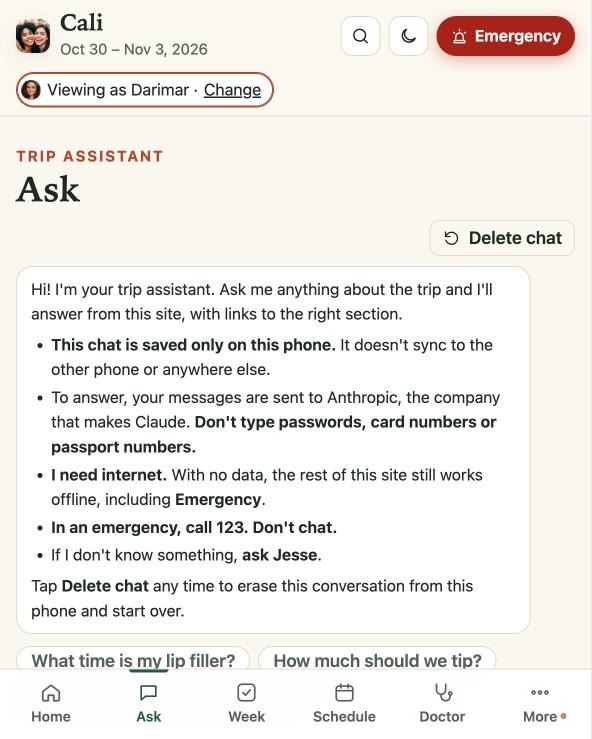 (enlarge)
The skill
Direct AI across every role while keeping the judgment, and the accountability, yourself.
Why it mattersCopy link to Why it matters, chapter 17
AI now does real work in research, writing, design, engineering and testing. That lets one person hold the whole picture, which removes the handoffs where understanding of the user usually leaks away. This is the fact behind the belief that the product manager is no longer needed. What the build showed is narrower. The AI answered every question about the midnight arrival that it was asked. A person chose the questions. The AI was also wrong more than once, and it took a person to notice.
How to practice itCopy link to How to practice it, chapter 17
- Brief like a product leader: what to build and why, in plain language, with the user’s situation attached. Send the fear with the feature.
- Write conventions once and enforce them every time: tone, privacy rules, what never appears where.
- Review every output against the source. Fluent is not the same as correct.
- Keep the calls: what’s safe, what stays private, when to stop.
- Compensate for working alone. With no second reviewer, the automated checks and the real users are your review.
Failure modes
- Prompt and pray. Shipping output nobody read against a source.
- Delegated judgment. Asking the AI what matters instead of telling it.
- Context starvation. Requesting “airport info” when the situation is a midnight arrival with luggage, cash and exhaustion.
In practice
- One person held every role: product manager, designer, researcher, developer, tester. AI did the execution in each: the research legwork, the writing, the code, the tests, the releases.
- The builder supplied the questions, the review and the calls. The process was a research report as the single source of truth and an automatic test of every release.
- The AI was wrong more than once. One mistake reached a user: the app asked a traveler for details she had already sent. A person noticed.
- The built-in assistant was taught the house rules, including which entries were jokes.
The cost, stated carefully. The AI cost was about $15–25 of a subscription, not counting the builder’s time. The case study estimates a US agency would have charged $150,000–350,000 for the same scope in five days before AI. That is an estimate, and the small number leaves out the builder’s hours and experience. AI collapsed the cost of execution in this build. It did not supply the knowledge of what good looks like, and that was the expensive part.
Copy link to In practice, chapter 17Ask yourself
- Does my brief carry the user’s situation, or just the feature name?
Exercise
Pick one feature and write the brief you’d give an AI: the user, the moment, the fear, the conventions, the definition of done and how it will be tested. If you can’t write it, the bottleneck isn’t the tool.
Copy link to Exercise, chapter 1718. Ship fast without breaking trust
Copy link to chapter 18The skill
Release as often as the situation changes, with checks that make release 55 as safe as release 1.
Why it mattersCopy link to Why it matters, chapter 18
Speed without gates makes every release a gamble, and gates that rely on memory get skipped. The checks worth automating are the ones that encode what you know about the user. Which three things, if broken, would fail her?
How to practice itCopy link to How to practice it, chapter 18
- Define your release invariants: the short list of things that must be true every single time. Derive them from the user’s situation, not from engineering habit.
- Automate them. A check that depends on someone remembering will eventually be skipped.
- Keep releases small. One change, one brief, one thing to verify.
- Manage the offline copy. Users running a saved version need to know when to refresh it.
Failure modes
- Rule decay. Standards followed on day one and forgotten by day four.
In practice
- 55 releases in one week. Each was tested automatically on phone-sized screens, offline, and for privacy leaks.
- Those three invariants are a description of the users: phone-only, sometimes without signal, with sensitive data in play.
- “Save it in the car to the airport” handled the offline copy: one instruction, at the right moment, for the final version.
Ask yourself
- What are my three invariants, and who or what checks them?
Exercise
Write your three release invariants. Next to each, write whether a person or a machine checks it. Automate one this week.
Copy link to Exercise, chapter 1819. Close the loop in the field
Copy link to chapter 19The skill
Stay present while the product is in use, and turn what happens into changes fast enough to help the same users.
Why it mattersCopy link to Why it matters, chapter 19
Plans meet reality on day one. The first real use teaches more than everything before launch, and most teams learn it too slowly to help the people who taught them. Users will also depart from your plan, and the useful response is to ask what they need now.
How to practice itCopy link to How to practice it, chapter 19
- Be reachable during the moments that matter, not just during business hours.
- Confirm critical handoffs live, before the user is committed.
- Treat every incident as content. What one user learned the hard way goes into the product.
- Let the product change roles when the situation does: from planner to support.
- Pre-compute plan B. Price the contingency before anyone needs it.
- When users depart from the plan, support them. Advice after the fact is for the next decision, not the last one.
Failure modes
- Launch and leave. The team’s attention moves on the day the users’ need begins.
- ”I told you so” support. Being right at the user’s expense.
In practice
- Before boarding, the driver and plate were confirmed in writing. On arrival, an unneeded second passenger was declined and the ride went straight to the hotel.
- At a store, a price quoted for an untagged bag rose 20% at the register. The traveler walked out and paid less at another branch. The lesson went into the app: no tag, get the price in writing before the register.
- When one traveler chose a different path than the plan advised, the app didn’t argue. Its role shifted to support: calm questions to ask, signs to watch for, and a flight-change plan priced in advance in case an extra day was needed. It wasn’t. The product has to work on the path the user takes, not only on the one you recommended.
- The live support during the trip was part of the product, not an afterthought to it.
Ask yourself
- When my users are in their hardest moment, can they reach anyone?
- Do I have a priced plan B for my users’ most likely disruption?
Exercise
For your last launch, list three things that happened in the field and surprised you. For each, measure the time from the surprise to a shipped change. Set a target for that interval and publish it to the team.
Copy link to Exercise, chapter 1920. Own the outcome, not the scope
Copy link to chapter 20The skill
Act as if the user’s result is your result, from the first idea until long after launch.
Why it mattersCopy link to Why it matters, chapter 20
Scope can be delivered while the user still fails. Most people who build software care. The structure they work in often pays for delivery, so it optimizes for sign-off, and the questions in this guide stop being anyone’s job.
| Topic | Hired to deliver | Owns the outcome |
|---|---|---|
| ”Done” means | The scope shipped and was signed off | They got home safe and the plan held up |
| Bad news | Softened to protect the timeline | Said plainly and early |
| After launch | Handed to support | Still answering at midnight |
How to practice itCopy link to How to practice it, chapter 20
- Define “done” as a sentence about the user’s life, not about your deliverable.
- Shorten the chain, or carry the context across it. Every handoff from research to product to design to engineering to QA loses something. Send the reason with the ticket.
- Apply the embarrassment test: if it failed this user, would you feel it personally? If not, you’ll miss what a spec misses.
- Pair care with craft. Care decides what’s worth building. Experience decides whether it works.
Failure modes
- Sign-off as success. The project closed green and the user was never asked.
- ”Out of scope” as an answer. True, and no help to anyone.
- The ticket that lost its reason. The instruction survived the chain and the purpose didn’t.
In practice
- “Done” was never 23 tabs. It was: they land, they get home safe, and the plan held up.
- Here the person who imagined a dark, unplanned stop on the airport road also wrote the rule, chose the words in Spanish, placed them on the arrival screen and tested them offline. A team can’t copy that. It can send the reason with the ticket.
Ask yourself
- What is my definition of done, and does the user appear in it?
- Where in my team’s chain does the reason behind a requirement get dropped?
Exercise
Rewrite your current project’s definition of done as one sentence about the user’s life. Share it with the team and note who objects, and to what.
Copy link to Exercise, chapter 2021. Measure what matters
Copy link to chapter 21The skill
Judge the product by what users do because of it, not by what it contains.
Why it mattersCopy link to Why it matters, chapter 21
Feature counts and release counts measure effort. Whether people keep using a product and act on it can’t be generated from a prompt. It comes from understanding them, so the honest measure of that understanding is what they did.
How to practice itCopy link to How to practice it, chapter 21
- Track behavior, in four questions: do they come back without being reminded, do they act on the advice, do they trust it with hard questions, do they tell others?
- Separate inventory (tabs, releases, sources) from outcome (what changed for the user).
- For small audiences, collect evidence, not statistics: specific incidents with a before and an after.
- Count the non-events, and be straight about them. Much of a safety product’s value is in what didn’t happen, which can be observed and can’t be proven.
Failure modes
- Vanity inventory. “23 tabs” presented as a result.
- Survey theater. Asking users whether they liked it, in place of watching what they did.
In practice
- Acted on the advice: lounges used on every leg, a 20% price jump refused at a register, the driver verified and an unplanned passenger declined on arrival night.
- Held up under pressure: one traveler was questioned by customs officers at the border. She had followed the guidance, there was nothing to find, and she was released.
- The headline numbers of the build (55 releases, 158 sources, 23 tabs) describe effort. The evidence that it worked is the short list above: incidents from one trip, reported by the builder, with no comparison. That is all the case can claim (see “Limits of this case”).
Ask yourself
- Which of my metrics would still look good if users were quietly failing?
- What did a user do last week, outside my product, because of my product?
Exercise
Write three behaviors that would prove your product worked for a user this week: things they did, not things they clicked. Check whether you could observe any of them today. If not, that’s your instrumentation gap.
Copy link to Exercise, chapter 21For managers
For managers: recognize it, don’t punish it
The argument at the front of this guide said the practice looks like overthinking. The person it bothers most is usually the manager. From that chair, the builders who care most about users can look like problems: they ask too many questions, cross lanes, push back on scope and spend time on details nobody requested. This section is for leaders who would rather keep that than train it out. If you build alone, you hold both roles, and the check below applies to your own impatience.
How to recognize itCopy link to How to recognize it
The signals are specific, and each one is easy to mistake for something else.
| What you see | How it reads from the manager’s chair | What it often is |
|---|---|---|
| They keep asking about edge cases and worst moments | Overthinking, slowing the team down | Designing for the moment the product will be judged |
| They ship details nobody asked for | Gold-plating, scope creep | The details users remember, found by imagining their day |
| They push back on a requirement | Not a team player | A user-based objection the plan hadn’t considered |
| They cross into design, research or testing | Stepping on toes, ignoring process | Refusing to let understanding get lost in a handoff |
| They raise bad news early | Negativity, noise | Protecting trust before it breaks |
| They talk about specific users by situation | Anecdotes instead of data | Facts a persona can’t hold |
The test that separates care from noise: ask “what will the user do, or avoid, because of this?” A builder who cares has a concrete answer, usually a person, a moment and a consequence. Noise doesn’t.
How managers punish it without meaning toCopy link to How managers punish it without meaning to
- Measuring output, not outcome. Velocity, tickets closed and features shipped reward the person who finishes the spec over the one who makes the user succeed.
- Reading pushback as disloyalty. Treating “this will hurt users” as a challenge to authority teaches people to stop saying it.
- Judging through your own priorities. A quarterly target, a stakeholder’s request or a roadmap date is real, but it’s yours. When a builder’s choice conflicts with it, the useful question is whether the plan or the builder is closer to the user.
A check for your own reaction: before you push back, finish this sentence: ”My objection is about the user because…” If you can’t, the objection is about your plan, your optics or your comfort. That may still matter. Say so honestly, and decide knowing what it costs the user.
How to embrace itCopy link to How to embrace it
Give them a narrow audience and real ownership. Depth needs a small, specific target. Let them own an outcome for a defined group, end to end.
Judge them on what users did. Retention, completion, trust, problems avoided. Ask for the story behind the number.
Shorten the chain around them. Fewer handoffs, direct access to users, permission to touch design, writing and testing.
Add guardrails, not walls. A time box, a written not-doing list and priority by consequence (irreversible and dated first) channel care without smothering it.
Protect them from burnout. People who care overextend. Ownership should come with recovery time, not an expectation of permanent heroics.
When care really is a problemCopy link to When care really is a problem
Care can go wrong, and good managers coach it. They don’t tolerate it blindly or crush it.
- Polishing what doesn’t matter while something dated slips. Coach prioritization by consequence (chapter 5), not less care.
- Hiding work until it’s perfect. Coach shipping in small, safe steps with automated checks (chapter 18).
- Treating their own taste as the user. Ask for the evidence: who, when, and what happened (chapter 1’s “the mirror”).
- Refusing every trade-off. Write the not-doing list together, so a “no” is a decision and not a defeat.
The goal is to aim the care, not to reduce it.
ExerciseCopy link to Exercise
Pick one person on your team who frustrates you by “going beyond the ask.” List the last three things they did that you didn’t request. For each, write what the user did or avoided because of it. If the list surprises you, change what you measure them on this quarter.
Checklists
Your checks are saved in this browser only.
Before you build
Before you commit to scope
Before you trust a fact
Before every release
When building with AI
While users are in the field
After
The last word
The tools have changed. Execution that once needed a team was done here by one person and an AI subscription. That is what makes people say the product manager is finished. In this build the opposite held. When almost anyone can build almost anything, what stays scarce is the part that was never building: knowing whom it’s for, seeing their worst moment before they do, and staying until it has passed.
That knowledge arrives as a run of small questions, most of them asked of yourself. What time does she land? Who is driving? What if the car stops? What does she say then, and in which language? Most of the answers turn out not to matter. A few turn out to be the product, and nobody can tell in advance which. So you ask all of them, and then you check, because some of what you imagined will be wrong and the user will make her own choices.
A spec doesn’t ask those questions. A persona can’t answer them. An AI will answer every one in seconds, once someone thinks to ask and stays to check the answer.
The one-line version: Imagine their worst moment in detail, check what you imagined, design for it, and stay with them on the path they actually take.
Put your product in hands that care how it lands.
If you’re building something people will depend on, we’d like to hear about it.